Wandering the Maine Coastline: Stow-Orono-Mt. Desert Island-Saco-Stow

IMG 6603

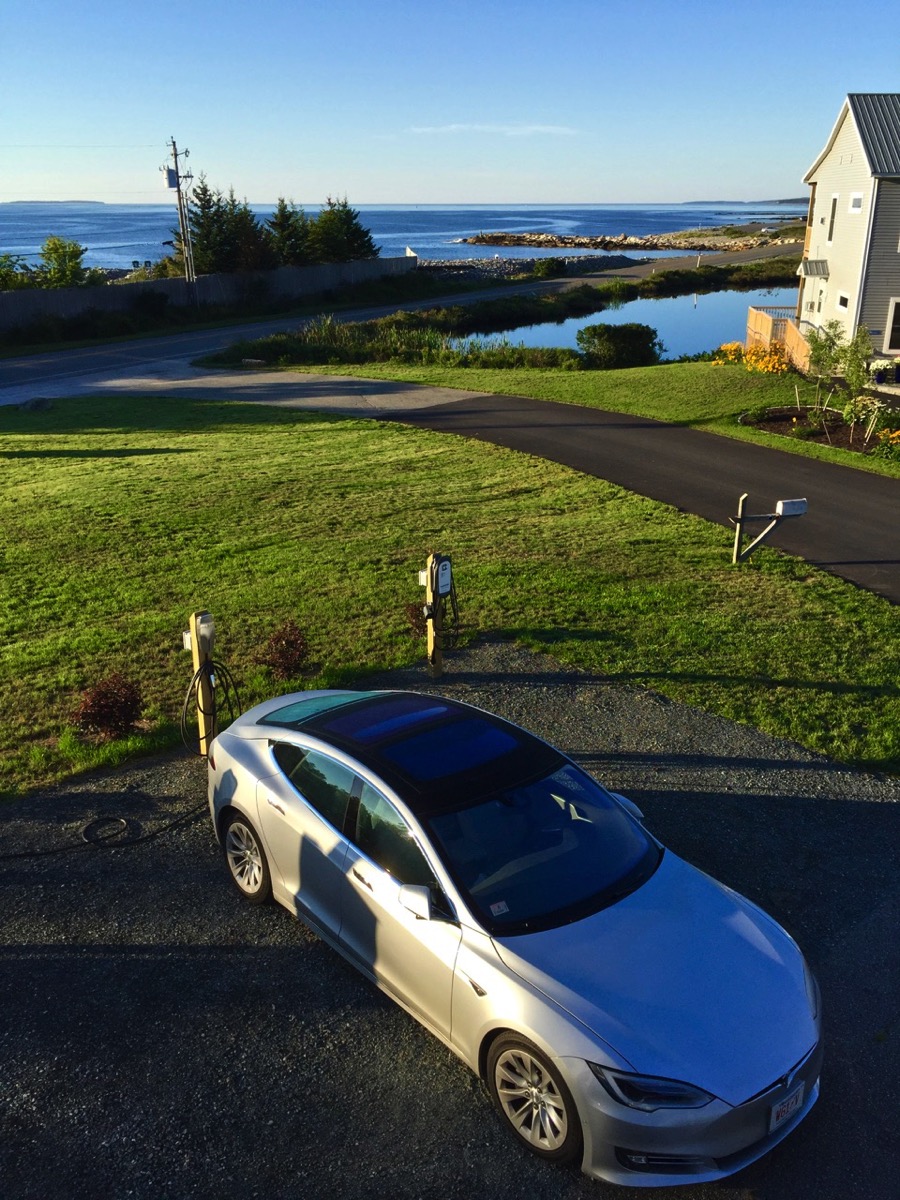
Lightning charging in front of the Seawall Motel just after dawn
Odometer: 3520 miles

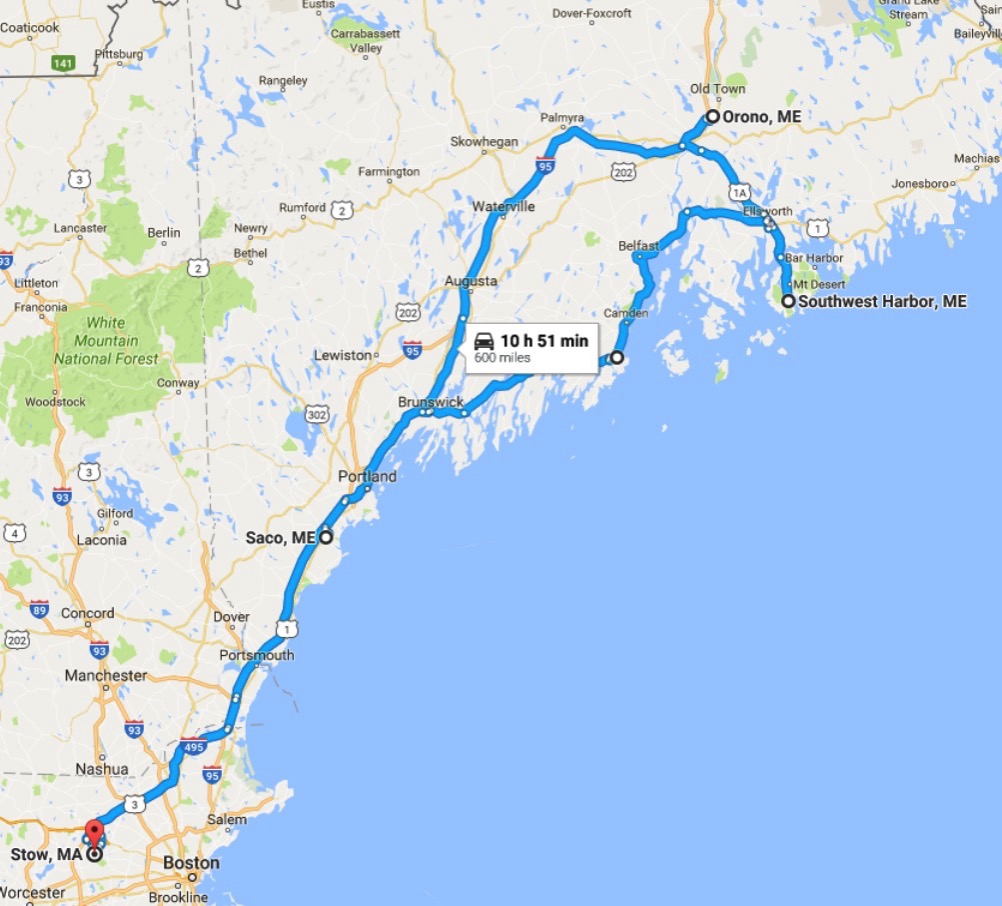
Sorry that it’s been a while since I updated this blog — I’ve been traveling on business so I haven’t been home to play with Lightning. However, our younger son David departed for University of Maine at Orono, ME last Friday, so we used this trip as an excuse to tour Mt. Desert Island and Acadia National Park in Lightning. The entire trip was roughly 600 miles, and, as one would hope, it went off without a hitch.

This trip was made a lot easier thanks to David and Vickie Lloyd, who run the Seawall Motel. Despite their being off the beaten path in Southwest Harbor instead of the more well-known Bar Harbor on Mt. Desert Island, they installed two Tesla destination chargers connected to a 100A circuit as well as a general purpose EV charger. The result was that we were able to supercharge at the Augusta, ME (so far the only supercharger in Maine), visit the UMaine campus, tour around Bar Harbor, and reach the Seawall with about 150 miles of charge left. We could then charge overnight there up to our full range of 284 miles (see the map below).
Screen Shot 2016 08 28 at 2 46 27 PM

We highly recommend other Tesla owners stay at the Seawall. We plan to return to the Seawall during future trips to Maine. It is open year-round and David and Vickie run a warm, comfortable and clean property. Oh yeah, they like Tesla owners too; Dave noted that he has yet to meet one who didn’t seem like an interesting person.

On Saturday, we walked around the fabulous rocky beaches around the Seawall Motel, toured the island, and worked our way down Route 1 to Saco, ME to visit a relative. We then pressed on to the Seabrook supercharger and headed home. As you can see from the map above, we covered just about 254 miles from our overnight charge at the Seawall until we hit the Seabrook supercharger, arriving with 10% charge. While we had no official backup plan if our energy consumption had run higher than expected, we did observe several public chargers listed on Plugshare.com in places like York, ME and Portsmouth, NH that we could have stopped at if necessary.

Our conclusions from this trip:

  1. Destination chargers are a big win. We wouldn’t have looked at the Seawall Motel if it hadn’t been flagged for us as having a destination charger. Further, if we hadn’t been able to charge at the Seawall, we would have had to hit the Augusta supercharger again on our way home. That would have required us to skip the first 75 miles or so down Route 1 or to have charged at some slower charging station. Having a destination charger allowed us to go where we wanted.
  2. The Bangor supercharger will bring more Teslas to northern Maine attractions. A new supercharger at the Bangor Mall in Brewer ME will be operational in a matter of weeks if not days. That will make Acadia, Bar Harbor, and the Southwest Harbor accessible to more Teslas. In fact, that charger will allow Teslas with 85kWh batteries and up to do round trips to Mt. Katahdin, the most northern point on the Appalachian Trail. Bonus fun fact: When it becomes operational, the Bangor supercharger will be the easternmost supercharger in North America.
  3. Range really isn’t a problem on this car. While we know there are places where no superchargers exist, there aren’t many places with no charging stations at all. Increasingly, we’re feeling like our Tesla is just like our other cars: we just pick up and go, and we will figure out where we will refuel along the way. Planning in advance optimizes the process and will save time, but we are finding that planning on the fly works just fine.

IMG 6605

Boston to Montreal and back

IMG 6550

Odometer: 2,538 miles

Well, Lightning performed flawlessly on our trip to Montreal and back. Unfortunately, my logging program didn’t perform nearly as well. You see, we received data from the car just fine while it was in the US. But when we reached Canada, all of a sudden, the car was no longer visible to the Web. My logger wasn’t really prepared for this eventuality, so it threw and exception and exited.

The other bug I had in my logger was that I vary the polling rate based on whether the car is engaged or not. When the car is parked, I only poll it every 20 minutes. When it is moving, I poll it every minute. What I hadn’t really accounted for though was when it was charging, when it would be nicer to have more granular monitoring of how fast it was charging and at what rate. I’m going to change that for the next go-around.

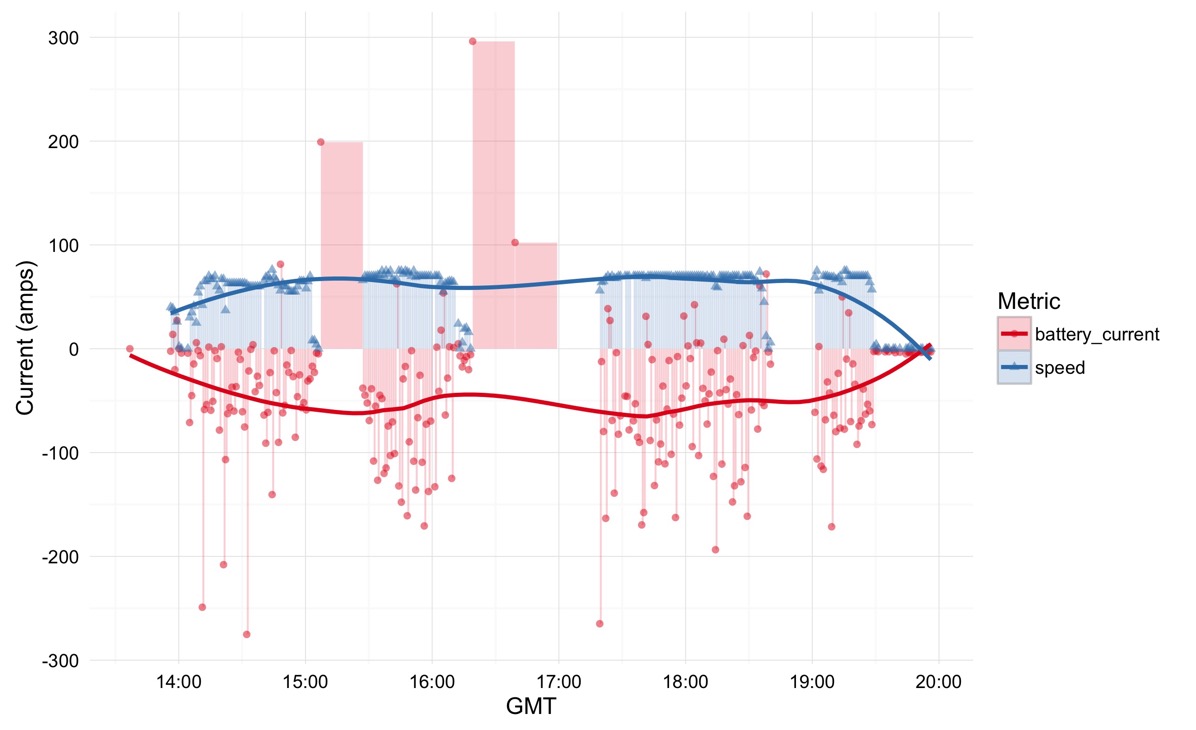
All that said, here’s an R ggplot of the data that I was able to collect on our trip up to the Canadian border:

Plot

The blue data points show the speed of the car while the red ones show the current draw. The lines are regressions plotted over data point for that metric. You can see the slow polling when the car was charging by those bars showing a few hundred amps going into the car; the current actually varies a lot more dynamically than I’ve shown, but my program just didn’t bother to collect the data.

You can see our long stop-and-go traffic wait at the Canadian border is shown at the end of the graph by what is essentially a period of about half an hour of zero speed and near zero current. You can also see some gaps in the coverage leading up to this point as we passed through areas of Vermont where there wasn’t great cellular coverage.

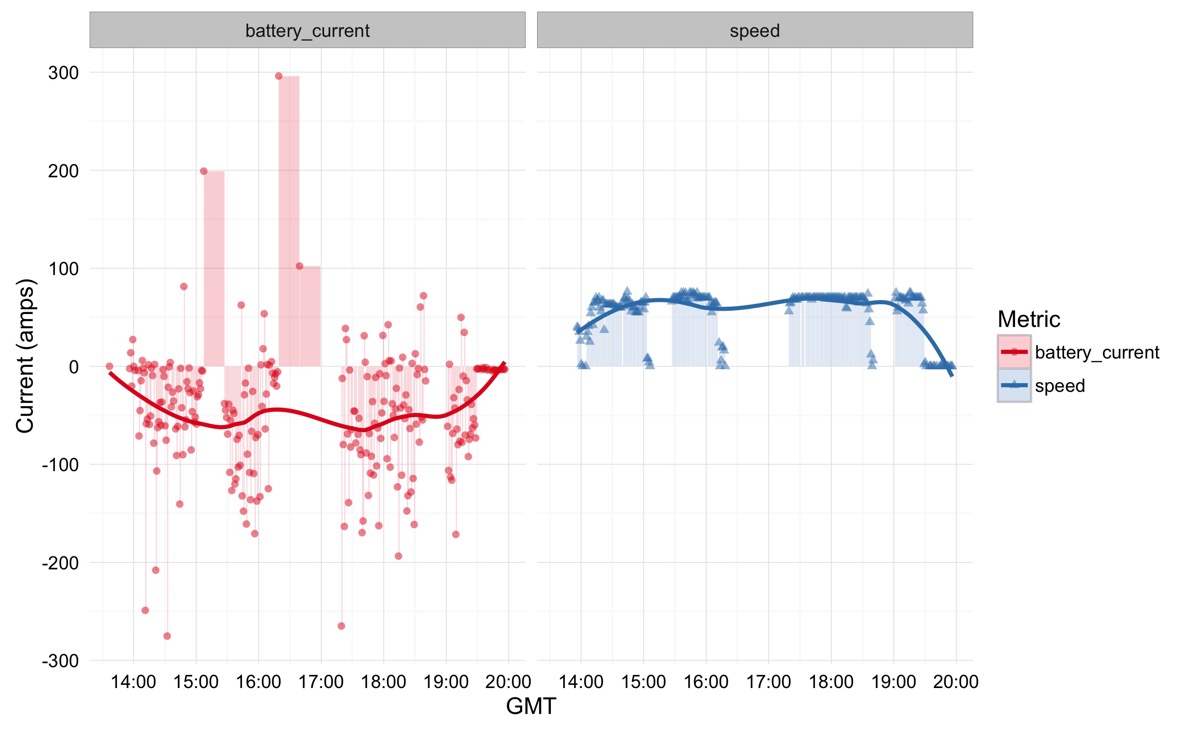
We can gain a bit more insight by pulling apart the variables into their own graphs using a technique called faceting. Here’s that graph:

Facet plot

The speed graph is about what you’d expect; the first hour was a bit erratic as we escaped Boston area traffic, but as the day wore on, we held a pretty constant 70 mph or so using Autopilot.

What’s more interesting is the current graph: note that it doesn’t map directly to the speed. This feature, of course, is due the fact that the road to Canada is not flat and requires us to traverse the Green Mountains along the way. You can see some pretty big positive battery current spikes that come from the regenerative braking on the descent from some of those mountains.

With these lessons learned, I’ll be updating my logging program for our next trip up to Maine to capture data more reliably. I should have some more data and pretty graphs to post around the end of the month.

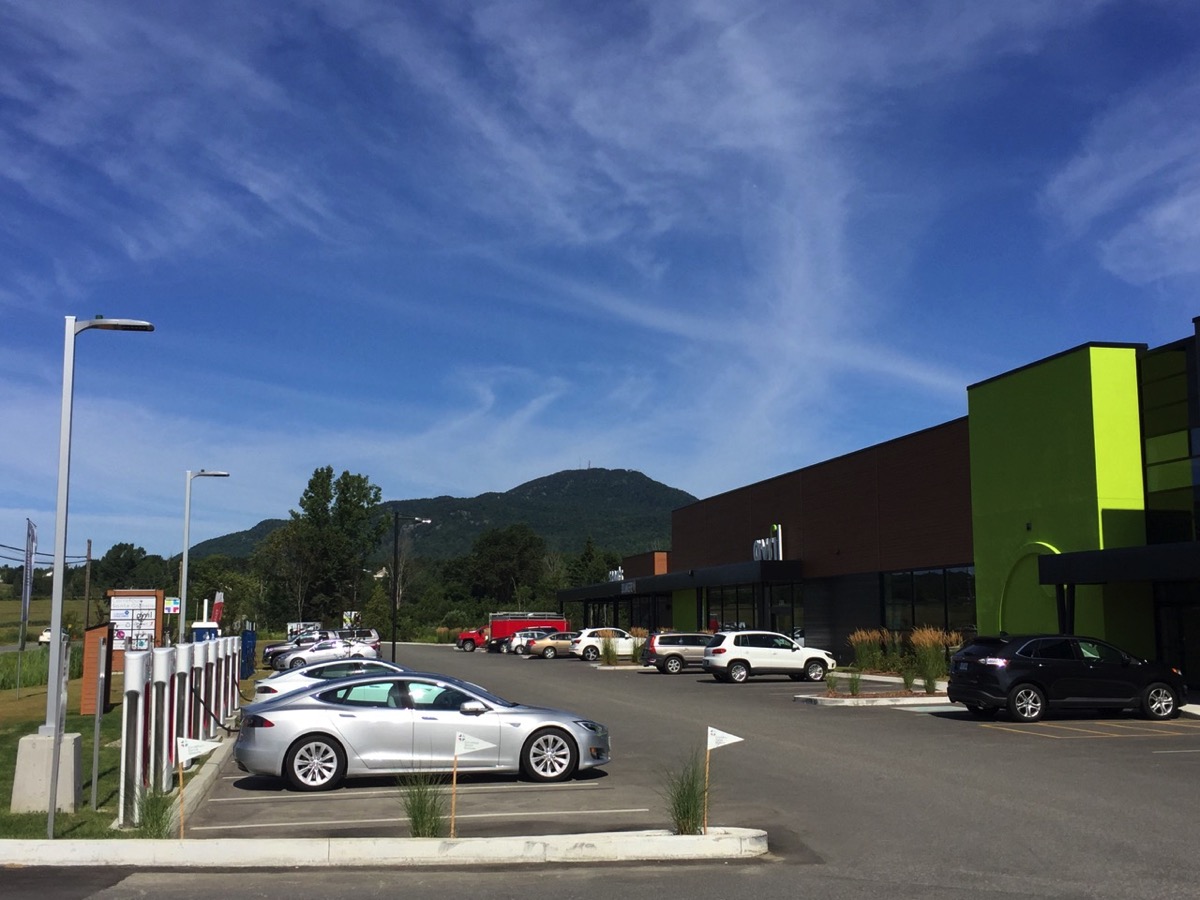
One final note: Canadians seem to love Teslas and electric cars in general. Not only did we get thumbs-up salutes from other drivers and curious folks coming over to look at the car, but I was really impressed at the charging stations in Canada. Here’s a photo of the Supercharger in Magog, Quebec:

IMG 6563

As you can see from the photo, Magog isn’t exactly in an urban area, but not only did it sport 8 Supercharger stalls, it had another 8 or so J1772 chargers AND a high-speed CHAdeMO charger. It was most impressive.

Logging Tesla efficiency and performance using the Web API

Graph of Tesla speed and battery current

Odometer: 1745 miles

One of the cool things about having an intelligent car with a built in LTE connection is the ability to ask it to provide information about itself. Tesla provides both iPhone and Android apps that allow owners to unlock the car, flash the lights, and monitor charging. However, as a Big Data geek and recovering data scientist, I’m more intrigued by recording information about the car so that I can monitor its performance and state over time.

So to begin, a quick shoutout to the developers who have made it possible for owners to monitor their Teslas:

So with all this work as a foundation, as a big data guy, I had to write my own data logger.

Just to be clear, what this API does is not monitor the car itself directly; instead, it communicates with Tesla’s servers that regularly monitor the car. So there’s a level of insulation between user code and the car that I am quite thankful for. I’d really hate to see someone’s buggy code decide to run my car’s stereo system volume up to 11, for example.

My current Tesla data logging program shares a Raspberry pi with a homegrown weather and solar panel monitoring system. Because I started with Rob M.’s example code, it’s written in Python and it’s pretty simple minded. What it does is poll my Tesla every 20 minutes and log its state into a .csv file. If it ever notices the shifter state is not None, it ups the logging rate to every minute until the shifter goes back to None again.

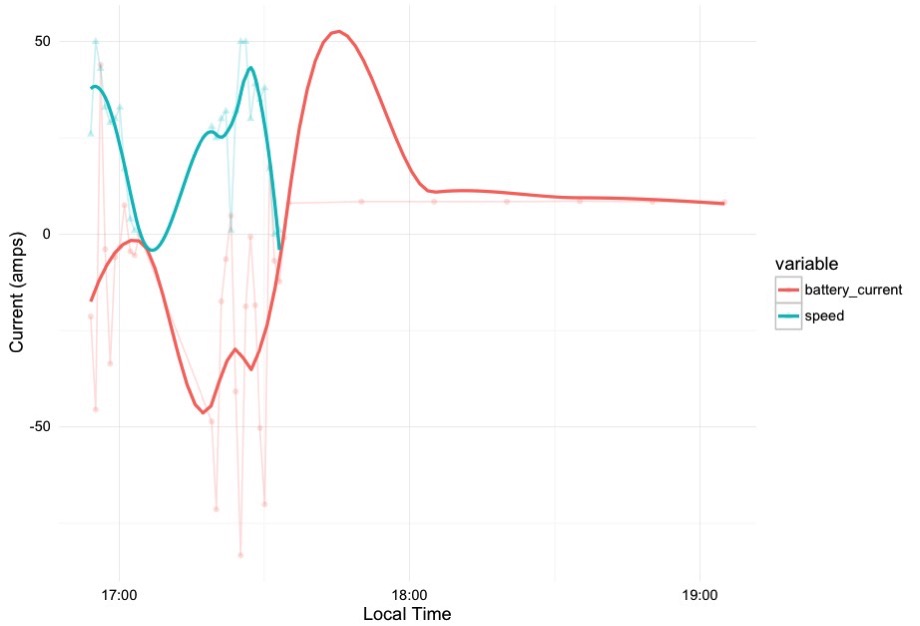
With the data in .csv form, I then can use R and ggplot2 to generate not only line graphs, but to apply a smoothing regression to the data to make it easier to see trends, as shown in the graphic at the top of this post. The blue line in that graph is the car’s speed, while the red line is the battery current, which goes negative when I’m driving the car and goes positive when it is being charged.

This is all pretty rudimentary stuff at present, but I hope to make it more sophisticated as time goes on. At the very least, I’ll have a nice hard baseline of data about driving efficiency and performance when the car was new to compare with as the car ages.

I’ll be driving Lightning to Montreal and back August 8 and 9, so I’ll be particularly interested to see the logs from that 700 mile trip. I’ll share what I learn after I’ve had a chance to analyze the data.